Annotations
Beaver reads the PDFs in your Zotero library and adds highlight and note annotations for you, just ask. Tell it what you're looking for in plain language, and it finds the relevant passages, marks them up, groups them by color, and tags them so you can pull them back up later.
Because Beaver is a Zotero plugin, everything it creates is a real Zotero annotation. It lives in your reader, syncs with your library, and works with every Zotero feature you already use.
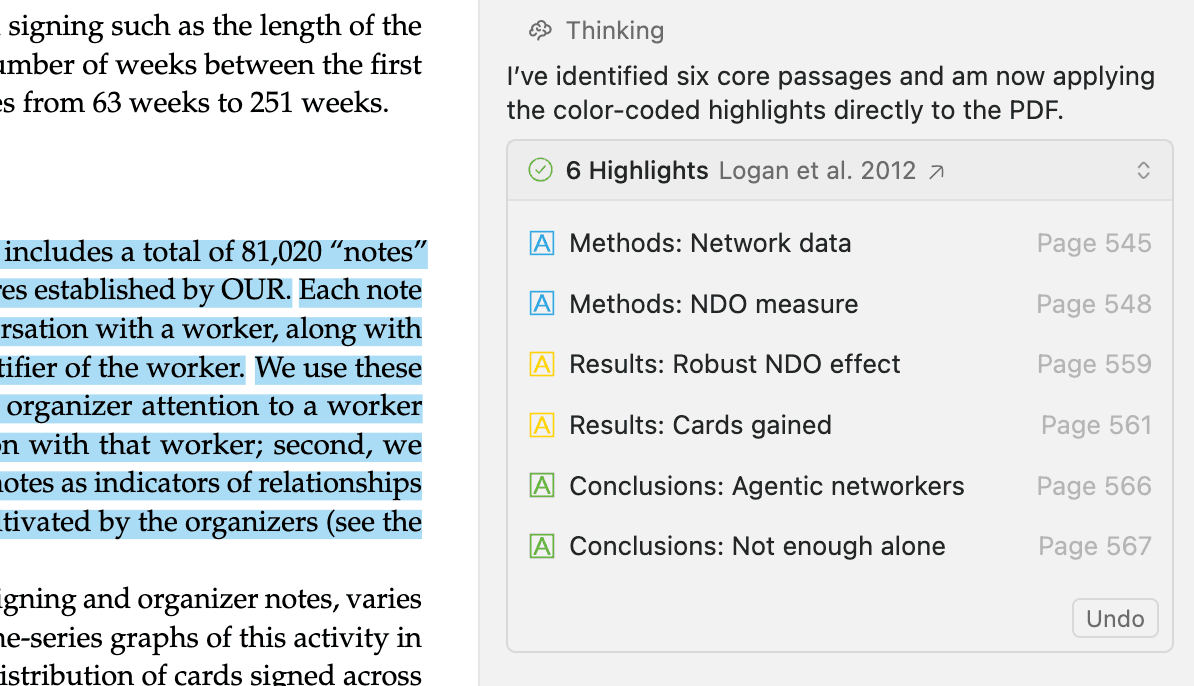
Creating annotations
Ask Beaver to annotate the paper you're reading using natural language. It works for both narrow, specific requests and broad, judgment-based ones:
Beaver identifies the passages that match your request and proposes the full set of annotations. Nothing is written to your library until you review and approve it.
Annotating many papers at once
Ask for the same annotation work across a collection and Beaver runs it as a batch job, annotating up to 100 documents in a single job with progress reported per document and a receipt at the end:
Organize your annotations by color or tag
Use color and tags to organize your annotations. Just tell Beaver your preferences (or add them to your custom prompt in settings) and it follows your lead.
Color is great for separating themes or topics. Hand Beaver a scheme using any of Zotero's standard annotation colors and it applies it consistently:
Tags make annotations findable across your library. Beaver applies the tags you ask for, so they stay consistent with the system you already use in Zotero:
Later, both color and tags become search filters so that Beaver can find each group of annotations when you ask. See Finding annotations below.
Annotation types
Beaver can create two types of annotations: highlights and notes.
Highlights mark text with a colored background. Each highlight can carry an optional comment, and Beaver can fill it in for you when you ask. Comments can include a short note on what the passage says, why it matters, how it fits into the overall argument, or other details you want to record.
Notes are standalone comments anchored to a precise location. Beaver places them at the exact sentence they refer to, or at a section heading. They're useful for:
- Explaining complex concepts in simpler terms
- Adding questions to follow up on
- Recording your thoughts or connections to other work
- Summarizing a section for future reference
- Comparing and contrasting a passage with other research in your library
For richer note requests, Beaver can pull in context from across your library:
Finding annotations
Beaver can search annotations across your entire library, not just the document you're reading.
You can search by:
- Highlighted text or comment content
- Tag and color
- Annotation type (highlight, underline, or note)
- Author, attachment, and collection
- Creation or modification date
Reusable Actions
If you annotate the same way across papers (highlighting key findings using colors, marking passages relevant to a project, adding notes that explain technical terms) you don't have to retype the instructions each time. Define the task once as an action and reapply it whenever you need it.
Actions appear based on what you're doing in Zotero, so you can trigger an annotation action from the slash menu in chat, from the Beaver home screen, by right-clicking an item in your Zotero library, or from the Beaver toolbar icon in the PDF reader. Beaver ships with built-in actions like Highlight key findings, and you can create your own for the annotation tasks you repeat most.
Learn more in the actions guide.
You Stay in Control
When Beaver creates annotations, all changes require your approval by default. Nothing is added to your library until you confirm. Review the proposed annotations, then Apply to add them or Reject to discard them. Applied annotations remain fully editable in your Zotero reader.
You can configure this behavior in Beaver settings:
- Always ask (default): Review every proposed annotation before it's applied
- Auto-apply: Trust Beaver to add annotations automatically
- Continue without applying: Let Beaver propose annotations that you can review and apply later
Advanced: Changing the annotation author
Beaver records itself as the author of the annotations it creates, so you can tell them apart from your own. You can, however, change that name or remove it.
Open Config Editor
Open Zotero → Preferences → Advanced → Config Editor
Find the setting
Search for beaver.annotationAuthorName
Enter a name
Enter the name you want, or leave it empty to create annotations with no author at all
A few things to know:
- Only annotations created from then on are affected. Anything already in your library keeps the author it was created with.
- Once the name is empty or matches your own, Beaver's annotations look exactly like your own, so neither you nor Beaver can filter them by author anymore.