Discover New Research with Web Search
Beaver can search over 240 million scholarly works outside your Zotero library using the OpenAlex database, helping you discover new research and expand your library. This feature is still experimental and will evolve and improve quickly.
Web search is designed based on two important principles:
- Your library comes first. Beaver searches your library first and is only encouraged to search for external references when your library contains limited information or when you ask for it.
- You are in control. Beaver proposes references, you can add them to your library or ignore them.
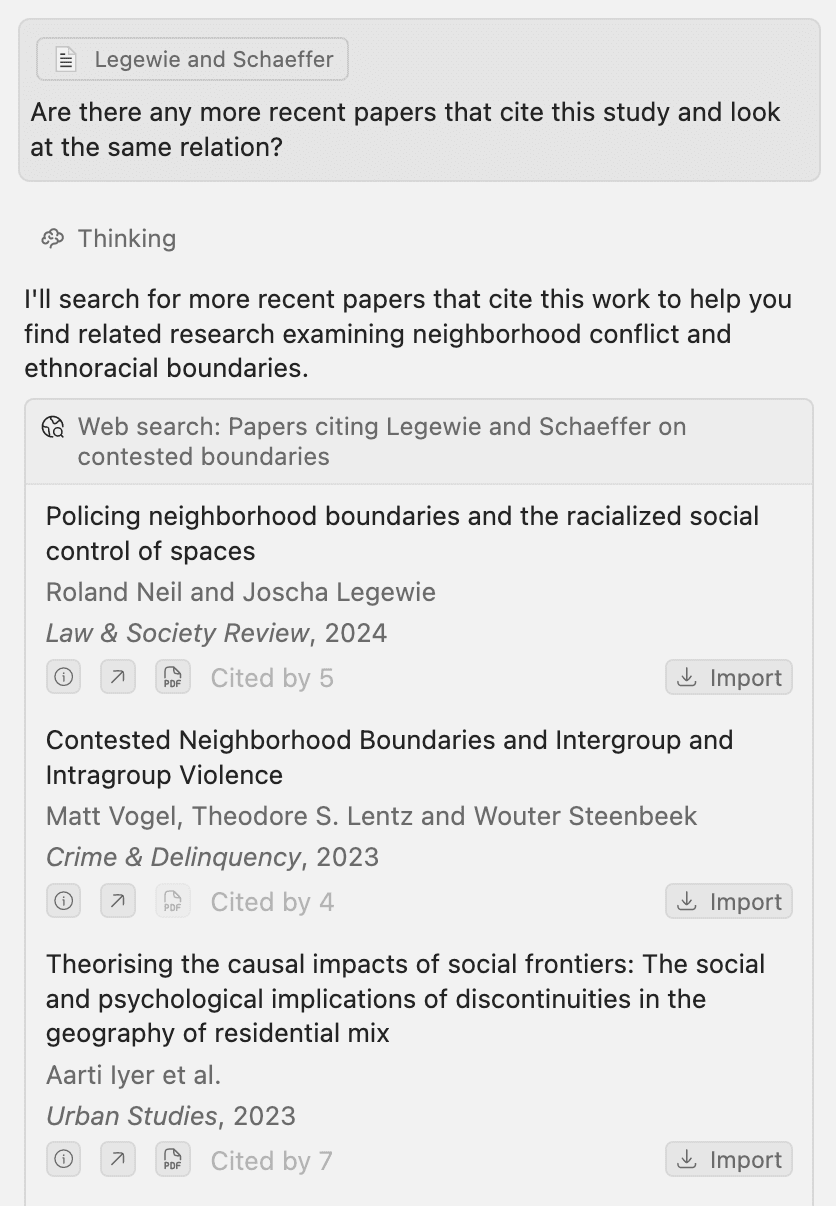
How to use Web Search
By default, Beaver searches your library first and is only encouraged to search for external references when your library contains limited information on a topic. You can also directly ask for web search or enable it using the small globe icon next to the send button.
How web search works
Beaver's web search is powered by an autonomous sub-agent that can browse OpenAlex to find relevant references. It can:
- Search by topic: Find papers on any academic subject
- Search by author: Find all works by specific researchers
- Follow citations: Discover papers that cite or are cited by specific references
- Identify influential work: Find highly-cited papers in a research area
- Explore journals: Find papers from specific venues
Citing and Importing External References
Beaver cites external references inline just like references from your library. To distinguish between the two, external references appear in blue while library references appear in gray.
Beaver automatically matches external references against your existing library. If an external reference is already in your library, it appears as a gray citation instead of blue and is excluded from the import list preventing duplicates and helping you see which papers you already have.
When Beaver's response includes external references, an import dialog appears at the bottom that allows you to import all external references that were cited in the model's response. Click the green checkmark to add all references to your library, or the red X to dismiss. Expand the dialog to review details and selectively import individual items.
Beaver uses Zotero's built-in import functionality, so references are added directly to your library and Zotero will attempt to obtain the full text automatically.

Primary Use Case: Discovery, not Deep Analysis
Web search is designed to help you discover and evaluate new references to add to your library. It excels at finding relevant papers and understanding their place in the research landscape. However, for in-depth analysis of papers, you'll need to import them into your library first.
Once imported, if Zotero successfully downloads the full text, Beaver can analyze the complete document and help you search within it.
Important Limitation: Metadata Only
Web search has access only to metadata: titles, authors, abstracts, publication information, and citation counts. To analyze full-text content, you must import the reference into your library first.