Notes
Beaver has full support for Zotero notes. It can create notes, search for notes, read existing ones, and edit them all while keeping you in control.
What Beaver can do with notes:
- Create notes: Generate literature reviews, paper summaries, research syntheses, and more saved directly to Zotero.
- Read and discuss notes: Read and discuss existing notes in your conversation. Add notes to your chat message or ask Beaver to search for notes in your library.
- Edit notes: Beaver can revise, restructure, and improve your notes, with every change requiring your approval.
Creating Notes
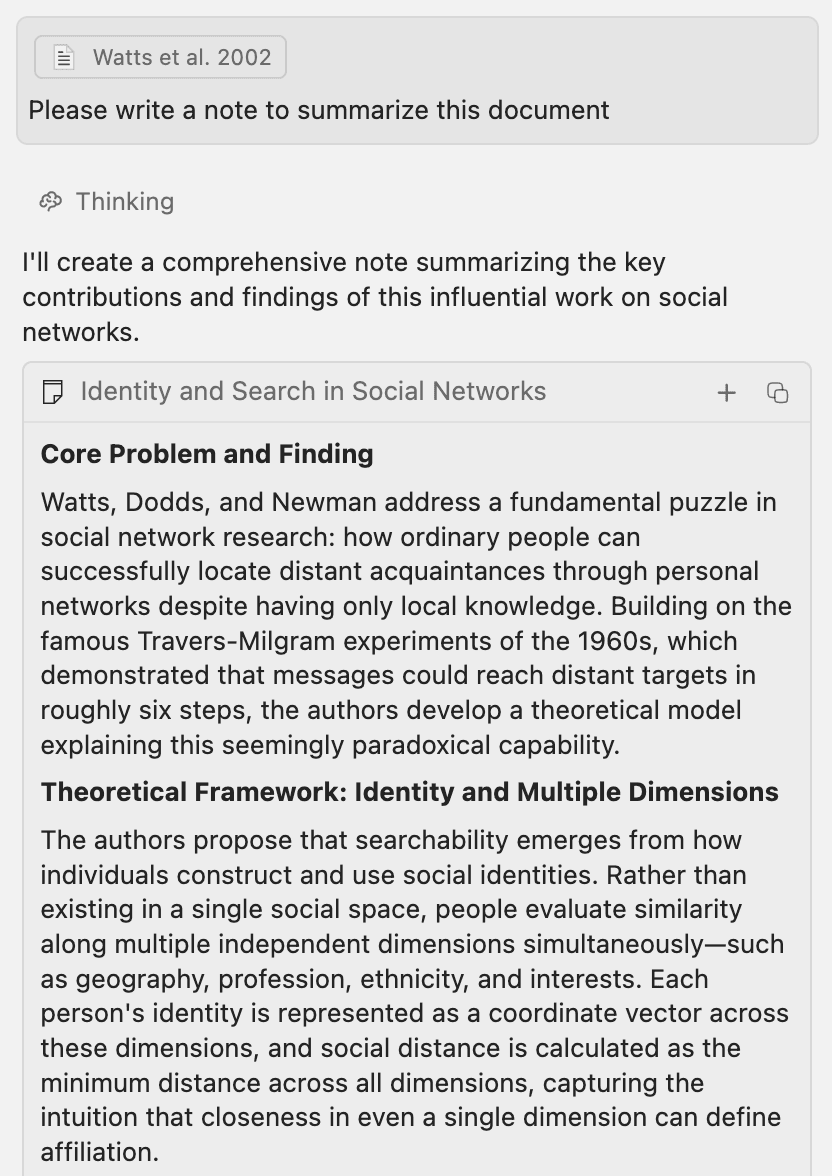
Beaver automatically creates notes for substantial written content like literature reviews, summaries, or structured syntheses. For brief responses, it answers directly in the conversation. You can also ask explicitly:
To write a note for every paper in a collection, ask for exactly that and Beaver runs it as a batch job, writing up to 100 notes in a single job — for example, "Add a note to every paper in my Microbiology collection summarizing what it found."
Each note includes a title, a save button to add it to your Zotero library (as a standalone note or attached to the selected item), and a copy button to grab the content as markdown.
With the setting "Auto-Create Zotero Notes" (enabled by default), Beaver will automatically create notes notes that are either attached to an item or created in a specific collections. Standalone notes that Beaver does not assign to a collection will not be created automatically (use the + button to create a note manually from the Beaver sidepanel).
Reading and Discussing Notes
You can attach an existing Zotero note to your conversation and ask Beaver to work with it. Drag and drop a note from Zotero into Beaver to add it to the conversation. When opening a note in a Zotero tab, Beaver will automatically add it to the conversation. Beaver can read the note content and answer questions, compare it to your library, or use it as context for further tasks.
Editing Notes
Beaver can edit your existing Zotero notes to improve structure, strengthen citations, tighten prose, or fill gaps. Edits work as precise find-and-replace operations: Beaver reads the note, identifies what to change, and proposes targeted replacements.
You Stay in Control
Every edit requires your approval before it's applied. When Beaver proposes a change, you see a visual diff showing exactly what will be modified: deletions in red, additions in green. You can:
- Approve individual edits one at a time
- Approve for this message approves all edits to this note for the current message
- Apply all to auto-approve remaining edits for that note in the current message
- Reject any edit you disagree with, optionally with feedback
- Undo any applied edit after the fact. Each edit can be reverted independently
Citations and Math
Note editing supports Zotero citations and math notation. Beaver can:
- Add new citations from papers in your library to support claims in your note
- Move or reorganize existing citations without breaking them
- Add or update math notation (LaTeX) when editing or creating notes
Built-in Note Actions
Beaver ships with built-in actions for common note workflows. These appear automatically when a note is selected in Zotero: in the home screen, slash menu, and right-click menu. See Actions for more on how actions work.
- Review and give feedback on this note — Identifies unclear arguments, unsupported claims, logical gaps, and inconsistencies. Provides feedback as comments rather than rewriting your note.
- Edit this note for clarity and structure — Tightens prose, fixes awkward phrasing, and improves logical flow while preserving your arguments and voice.
- Check and strengthen citations — Reviews every claim and citation, searches your library for supporting papers, and adds or improves citations throughout the note.
You can also create your own note actions in Preferences > Prompt & Actions for workflows specific to your research.